What is ProxyCap?
ProxyCap is a powerful proxy management tool that allows users to route network traffic through SOCKS5, HTTP, and HTTPS proxies at the system level. It supports rule-based routing, automatic startup, and connection testing, making it an essential tool for anyone looking to enhance privacy, bypass geo-restrictions, and optimize internet performance. By integrating Toolip with ProxyCap, you gain full control over your proxy settings, ensuring a secure and reliable online experience. Prefer an enterprise-grade guide? Learn more about Oculus Proxies Proxycap Integration Guide.How to Integrate Toolip With ProxyCap
1
Install ProxyCap
1. Download ProxyCap from the official website.2. Complete the installation process by following the on-screen instructions.3. Launch ProxyCap after installation.
2
Add a New Proxy Server
1. In the ProxyCap interface, navigate to the Proxies tab.2. Click New Proxy Server to start the configuration.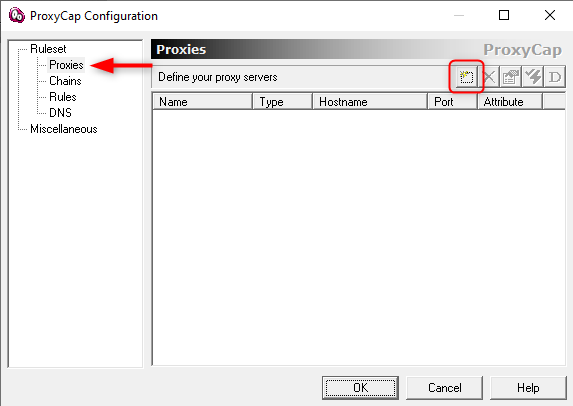
3
Enter Toolip Proxy Details
1. In the proxy configuration window, fill in the following fields: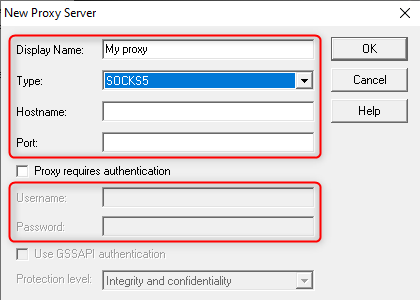
- Display Name: Assign a recognizable name (e.g., “Toolip Proxy”).
- Type: Select SOCKS5, HTTP, or HTTPS based on your proxy type.
-
Hostname: Enter
proxy.toolip.io. - Port: Find the correct port number in your Toolip dashboard.
- Username: Enter your Toolip proxy username.
- Password: Enter your Toolip proxy password.
4
Verify the Proxy
1. Click OK to save your settings.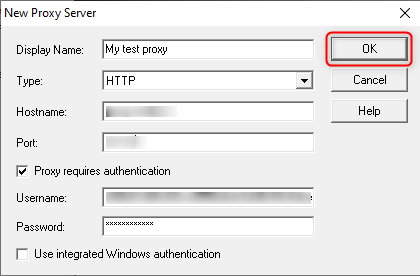
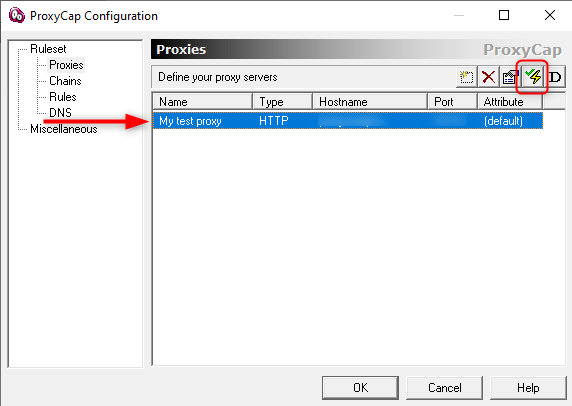
5
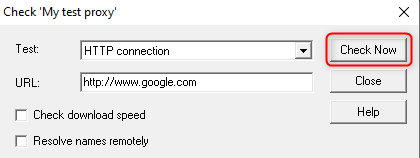
Run a Connection Test
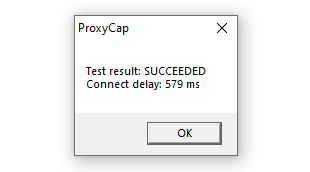
1. Enter a destination URL (e.g., httpbin.org/ip).2. Click Check Now to verify that your traffic is routing through the Toolip proxy.