


What is Capsolver?
Capsolver is an advanced CAPTCHA-solving service that automates bypassing CAPTCHA challenges, making it essential for automated workflows. By integrating Toolip, you can solve CAPTCHAs securely, maintain anonymity, and access region-specific content with ease.Why Use Toolip With Capsolver?
✅ Anonymity: Protect your real IP address while solving CAPTCHAs. 🌍 Geo-Targeting: Use country-specific proxies to access regional CAPTCHA solutions. 🔗 Reliable Connections: Ensure uninterrupted CAPTCHA-solving for smooth automation. Prefer an enterprise-grade guide? Learn more about Oculus Proxies Capsolver Integration Guide.How to Integrate Toolip With Capsolver
1
Log In to Capsolver
1. Visit the Capsolver website.2. Log in to your account to access the dashboard.
2
Open Proxy Configuration
1. Open the Capsolver Extension.2. Navigate to the Settings section.3. Locate the Proxy option and toggle it On to enable proxy settings.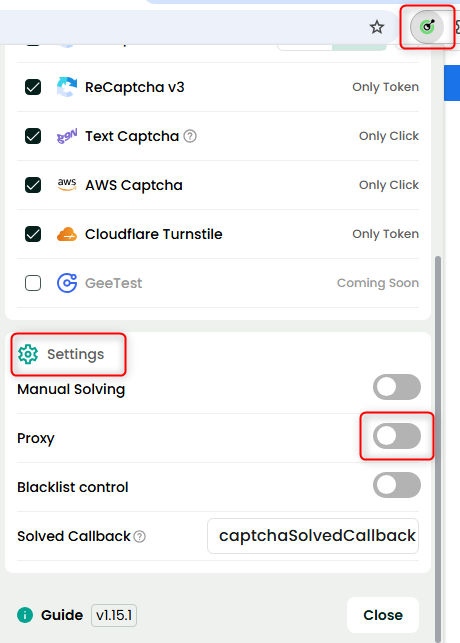
3
Add Your Toolip Proxy Details
1. In the proxy settings, enter your Toolip credentials: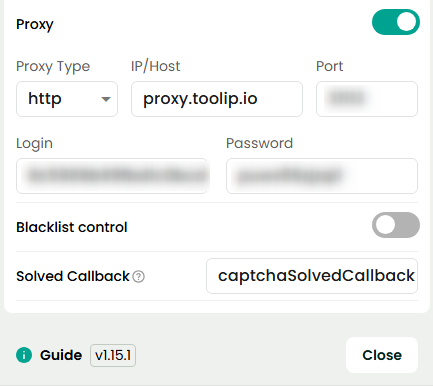
-
Host:
proxy.toolip.io - Port: Use the port from your Toolip dashboard.
- Login: Enter your Toolip proxy username.
- Password: Enter your Toolip proxy password.
To use proxies from a specific country, adjust the username format:
your-username-country-XX (e.g., your-username-country-US).4
Verify & Save Settings
1. Click Test Proxy to ensure the connection is active.2. Once verified, click Save to store the settings.